The Smart Home Job Folder: Eight Records Integrators Already Keep That Can Support an R&D Credit
Most smart home integrators already generate the records that can support an R&D credit claim. This post walks through the eight job-folder items that matter and the one habit that makes them more useful.

TL;DR
- Your job folders probably already hold much of what supports an R&D credit claim: programming revisions, commissioning notes, troubleshooting tickets, and change orders.
- The records that tend to matter most connect a person, a project, and a technical problem that was not solved by a standard install.
- One short “why” line added to the notes you already write can make a large difference, and it costs seconds, not hours.
The credit in one paragraph
The federal research credit under IRC Section 41 is generally a percentage of qualified research expenses, such as wages for people doing or directly supervising the work, supplies consumed in testing, and certain contract research. For smart home integrators, the question is rarely “did we do R&D?” in the lab-coat sense. It is “did we work through a real technical problem, and can we show it?” The regulations ask taxpayers to keep records in sufficiently usable form and detail to support the expenses claimed (Treas. Reg. 1.41-4, paragraph (d)). The IRS says the same thing in its Form 6765 instructions. Nothing there asks for a special system. It asks for evidence.
Why the job folder is the right place to look
Integrators tend to assume documentation means new paperwork. Usually it does not. A whole-home system with a custom lighting scene engine, a multi-vendor audio distribution plan, a network built to carry it all, and a control interface that has to behave on day one generates a trail of files whether anyone is thinking about taxes or not. The task is to recognize which of those files tell the story of a problem being worked out.
Whether any given project qualifies depends on the specific activities, documentation, and facts. Routine installs generally do not. Work where the right design or method was not known at the start, and you tested alternatives to find out, may.
Eight records worth keeping together
1. Programming and configuration revision history. Saved project files, version labels, and change notes for your control platform show how a design evolved. A sequence of revisions that reflects testing and correction can say more than a final file does. Keep the intermediate versions, not only the one that shipped.
2. Custom driver, module, or integration code. If your team wrote or modified a driver to make two systems talk, or scripted logic that no template provided, the code history and comments are strong evidence of technical work. Even a short note on what the vendor integration could not do is useful.
3. Commissioning and test notes. What you tried, what failed, and what you changed. Latency in a scene, a lighting protocol that dropped devices, a network that behaved on the bench but not in the house. Dated notes, photos of test setups, and screenshots of logs all help.
4. Troubleshooting tickets from the build phase. Tickets created during the project, before handoff, can show uncertainty being resolved. The same tickets created after the system is in service are usually treated as support, not development, so label which is which.
5. Change orders and scope revisions. A change order driven by a technical finding (“the original audio plan could not meet the room’s requirements, so we redesigned the zoning”) connects a business reason to a technical one. Add a plain sentence on the cause.
6. Design documents and drawings. Single-line diagrams, network topology drawings, rack layouts, and signal flow sketches, including earlier versions that were replaced. Redlines count.
7. Prototype and test supplies. Equipment and materials consumed in a test, such as a trial setup or sample devices used to validate a design, may count as supplies. Equipment you bought and installed for the client generally is not a supply for this purpose, and depreciable property is treated differently. Keep invoices and note what each was for.
8. A person-to-project link. Which designers, programmers, lead installers, and field techs worked on which jobs, and roughly in what proportion. Timesheets, project management exports, and payroll records can all serve. Wages can include people who directly perform the work, directly supervise it at the first-line level, or directly support it. General administration generally does not qualify. The Form 6765 instructions explain these categories.
What to leave out of the folder (and out of the claim)
Records are only helpful when they point at the right activities. Several things commonly sit near the good material but may not belong in a claim:
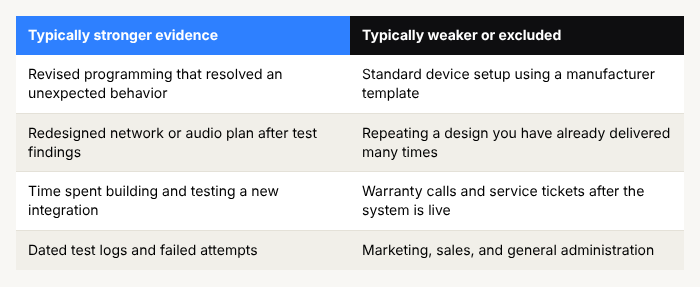
The regulations also draw a line once a business component is ready for commercial use. Work after that point, such as production-style repetition, generally falls outside the credit (Treas. Reg. 1.41-4(c)(2)). For an integrator, think of it as the difference between solving a problem on a project and repeating a known solution on the next one. The same reasoning applies if your team is doing a customer’s job in a customer-funded arrangement: contract terms can matter, so keep the signed agreements in the same place.
The one habit that makes everything above more useful
Add a single sentence, at the time, to the notes you already write: what was the problem, and what did you try? Something like “Zone 3 audio dropped under load, tried a different switch config, then moved the stream to a dedicated VLAN.” That is ten seconds of effort. It turns a vague entry into a clear record of uncertainty and experimentation, and it is far easier to write on the day than to reconstruct a year later.
Two smaller habits are worth adopting alongside it:
- Keep failed attempts. Dead ends are not clutter. They are evidence that the answer was not known in advance. Success is not required for work to count.
- Name the project in your time and payroll records. A project code on a timesheet entry or a project management export is often all it takes to link a person to a job.
What this looks like in practice
You do not need to rebuild your back office. Most integrators pick one place for each of the eight items (a shared drive folder per job is a common choice), agree on a naming convention, and make the “why” sentence part of closing out a commissioning step. A Smart Home Integration client, Argenta Solutions, identified $327K in credits across multiple years of work. Individual results vary, and every claim depends on the facts of the business and the quality of its documentation.
If your records are patchy for past years, that does not automatically end the conversation. Payroll, project files, invoices, email threads, and system logs can often be used to reconstruct what happened, though contemporaneous records are generally stronger. Whether prior years remain open to claim depends on filing timelines, so it is worth asking early.
Where the credit fits among your other priorities
Strata offers three service tiers (Self-Serve, Full-Service, and Enterprise) so owners can choose how much of the journey they carry themselves. In every case, the engagement is designed to be modest on your team’s time and to produce a documentation package built to support the claim. The first step is a $0 initial assessment, and a typical engagement runs four to eight weeks, depending on how quickly information is available.
Bring us your questions first
If you are wondering whether your job folders hold enough to support a claim, or which of your recent projects are worth looking at, bring those R&D credit questions to Strata first. Book a 15-minute review at stratataxgroup.com/contact. We will size your potential credit, answer your questions, and point you down the right path.
This post is for informational purposes only and does not constitute tax or legal advice. Consult a qualified tax professional regarding your specific circumstances.
Author
Strata R&D Tax Group